Nine steps from sign-in to the compute sweet spot — the core workflow of the QPI Photonic Inference Simulator, shown exactly as the GUI presents it. Consider it a guided tour of the essentials — the simulator goes well beyond it.
This tutorial walks you through the full photonic inference pipeline — from model loading to photonic non-idealities, throughput dashboards, and Pareto optimization.
WHO THIS IS FOR — This guide is built for engineers, researchers, and developers exploring photonic acceleration.
What you will learn
01How to run real neural-network models through a photonic-compute abstraction
02How photonic non-idealities affect inference
03How to interpret throughput and Pareto dashboards
9 steps · ~15 minutes
00
Sign in
step 1 of 9
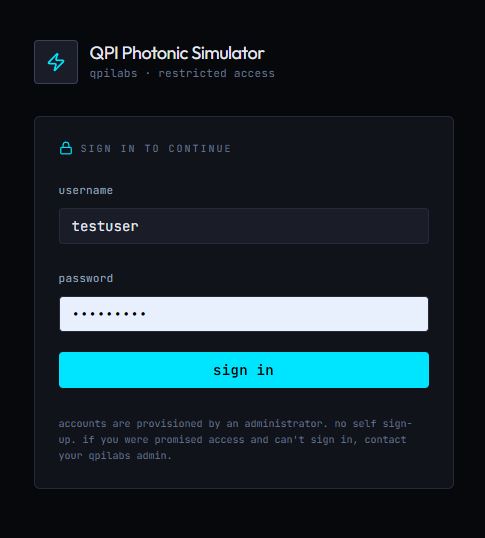
The simulator sits behind a sign-in wall. Accounts are provisioned by a QPI Labs administrator on request.
TIP — Bookmark simulator.qpilabs.com — that is where the Photonics Classifier lives.
01
Load the model & the dataset
step 2 of 9
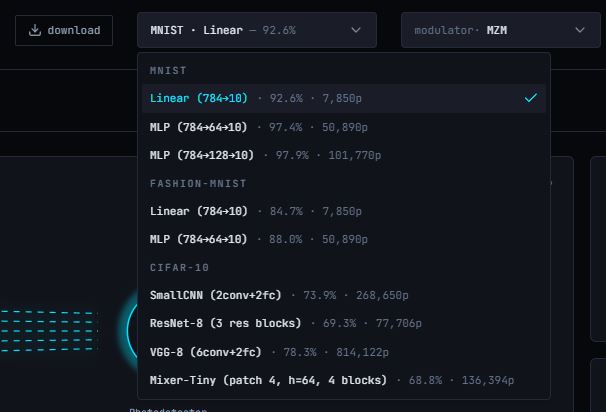
The first dropdown is the model picker, grouped by dataset: MNIST, Fashion-MNIST and CIFAR-10. Every entry ships pretrained, with its ideal accuracy and parameter count printed right in the list — Linear (784→10) at 92.6% for a quick run, the MLPs (784→64→10, 784→128→10) in the middle, and CIFAR-10 backbones like SmallCNN, ResNet-8, VGG-8 and Mixer-Tiny when you want the pipeline to sweat.
Pick a model and the simulator loads it together with its dataset; the download button next to the dropdown grabs the checkpoint. Every test sample is then run through the photonic pipeline twice — once ideally, once with every non-ideality switched on — and the sample view compares the ideal softmax in grey against the photonic result in blue.
fig. 01 — model & dataset dropdown · pretrained, with accuracy and parameters
TIP — Start with the small Linear model to learn the knobs, then climb to VGG-8 — the noise levels you chose suddenly matter a lot more.
02
Pick a modulator technology
step 3 of 9
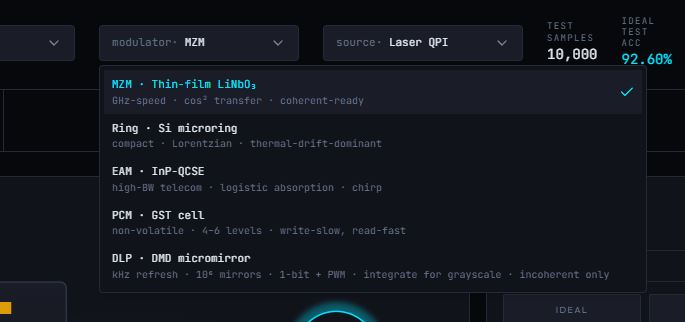
The modulator dropdown lists five technologies, each with its physics printed right underneath: MZM · Thin-film LiNbO₃ (GHz-speed, cos² transfer, coherent-ready), Ring · Si microring (compact, Lorentzian resonance, thermal-drift-dominant), EAM · InP-QCSE (high-BW telecom, logistic absorption, with chirp), PCM · GST cell (non-volatile, 4–6 levels, write-slow read-fast) and DLP · DMD micromirror (kHz refresh, a million mirrors, 1-bit + PWM — integrate for grayscale, incoherent only).
Swap between them and watch the accuracy react instantly. The MZM is the fast, coherent-ready default — keep it biased near quadrature with a small drive to stay linear. The ring is compact and thermally tuned; the EAM trades the curve for bandwidth plus chirp; the PCM cell holds its weight with zero standby power across 4–6 discrete levels; and the DMD is free of analog error, quantizing every weight to bits as the incoherent-only option.
fig. 02 — modulator dropdown · five technologies, physics included
TIP — Five modulators, one model: step through all of them with the noise fixed, and each drop in accuracy is that technology's true price.
03
Choose the laser source
step 4 of 9
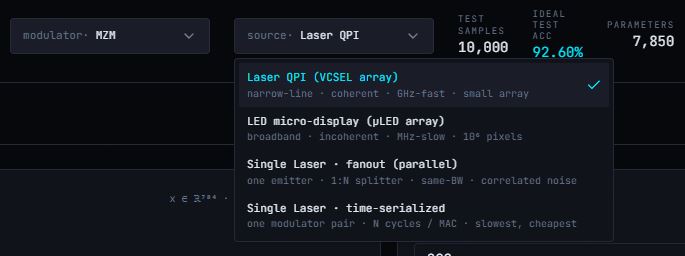
The source dropdown offers four ways to make the light: VCSEL array — narrow-line, coherent, GHz-fast, small array; LED micro-display (LED array) — broadband, incoherent, MHz-slow, 10⁶ pixels; Single Laser · fanout (parallel) — one emitter through a 1:N splitter, same bandwidth, correlated noise; and Single Laser · time-serialized — one modulator pair, N cycles per MAC, slowest but cheapest.
Each route pays a different bill. The VCSEL array keeps every channel coherent and GHz-fast, but costs an emitter per channel. The fanout shares one emitter across the array — bandwidth survives, yet the noise becomes correlated across channels. Time-serializing reuses a single modulator pair over N cycles per MAC: the slowest and cheapest path. And the LED micro-display is the odd one out — a million incoherent pixels, closer to a projector than a laser system.
Set the source power last: 1.0 is nominal — dim it and you trade SNR away, boost it and you buy SNR back with power dissipation.
fig. 03 — source dropdown · four ways to make the light
TIP — Same model, four sources: swap and watch accuracy and throughput react — correlated noise is the fanout's hidden tax.
04
Go coherent — or stay direct
step 5 of 9
Detection is a two-way toggle. Incoherent · direct detection: a photodiode simply reads |E|² — intensity only, the simplest hardware. Coherent · homodyne with a balanced detector: the signal is mixed with a local oscillator, which makes signed multiplication native — and makes phase noise matter.
Going coherent unlocks its own controls: more LO power lifts the shot-noise SNR, the LO's phase noise σ blurs what it measures, and the balanced detector's CMRR quietly suppresses the laser's RIN — roughly 31.6× at 30 dB, essentially total at 60 dB. That is why the coherent path can beat incoherent detection at the same nominal laser noise.
fig. 04 — detection toggle · incoherent vs coherent
TIP — Coherent buys you signed weights and a cleaner readout — it rewards a low phase noise σ, which pairs beautifully with a strong CMRR.
05
Inject the non-idealities
step 6 of 9
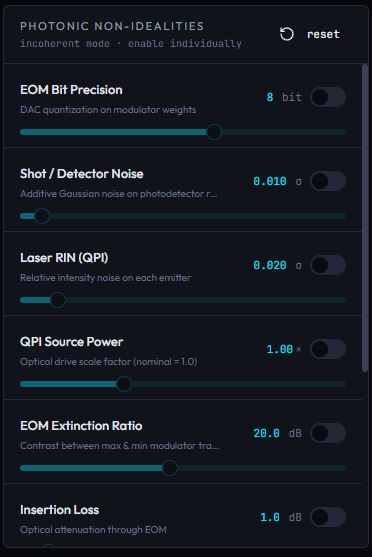
The Photonic Non-Idealities panel is the lab bench — a list of switches to enable individually, each with its own slider and live value: EOM Bit Precision (DAC quantization on the modulator weights), Shot / Detector Noise (additive Gaussian noise on the photodetector reading), Laser RIN (relative intensity noise on each emitter), Source Power (the optical drive scale factor, nominal 1.0), EOM Extinction Ratio (contrast between the max and min of the modulator transfer) and Insertion Loss (optical attenuation through the EOM).
Flip a toggle, drag a slider, and the next inference runs through degraded hardware — the defaults read 8-bit weights, σ = 0.010 detector noise, σ = 0.020 RIN, 20 dB extinction and 1 dB insertion loss. The reset button restores every switch at once.
TIP — Enable one non-ideality at a time to learn its individual price — then switch them all on together for the real hardware story.
06
Run a batch evaluation
step 7 of 9
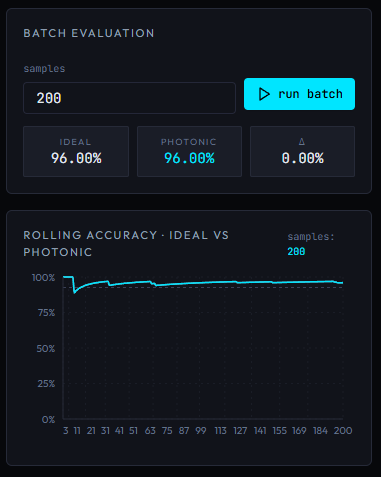
One sample is an anecdote; a batch is a verdict. Set the number of samples (200 here), hit run batch, and the panel streams them through the noisy pipeline.
The verdict lands in three tiles — IDEAL, PHOTONIC and the Δ between them (96.00%, 96.00%, 0.00% with these settings) — while the rolling-accuracy chart traces both runs as they settle: ideal dashed, photonic in solid cyan. Widen the gap by turning the noise up in the panels above, then close it again by fixing the optics.
fig. 06 — batch evaluation · rolling accuracy, ideal vs photonic
TIP — The Δ tile is the headline — it shows exactly what your hardware choices change.
07
Read the throughput dashboard
step 8 of 9
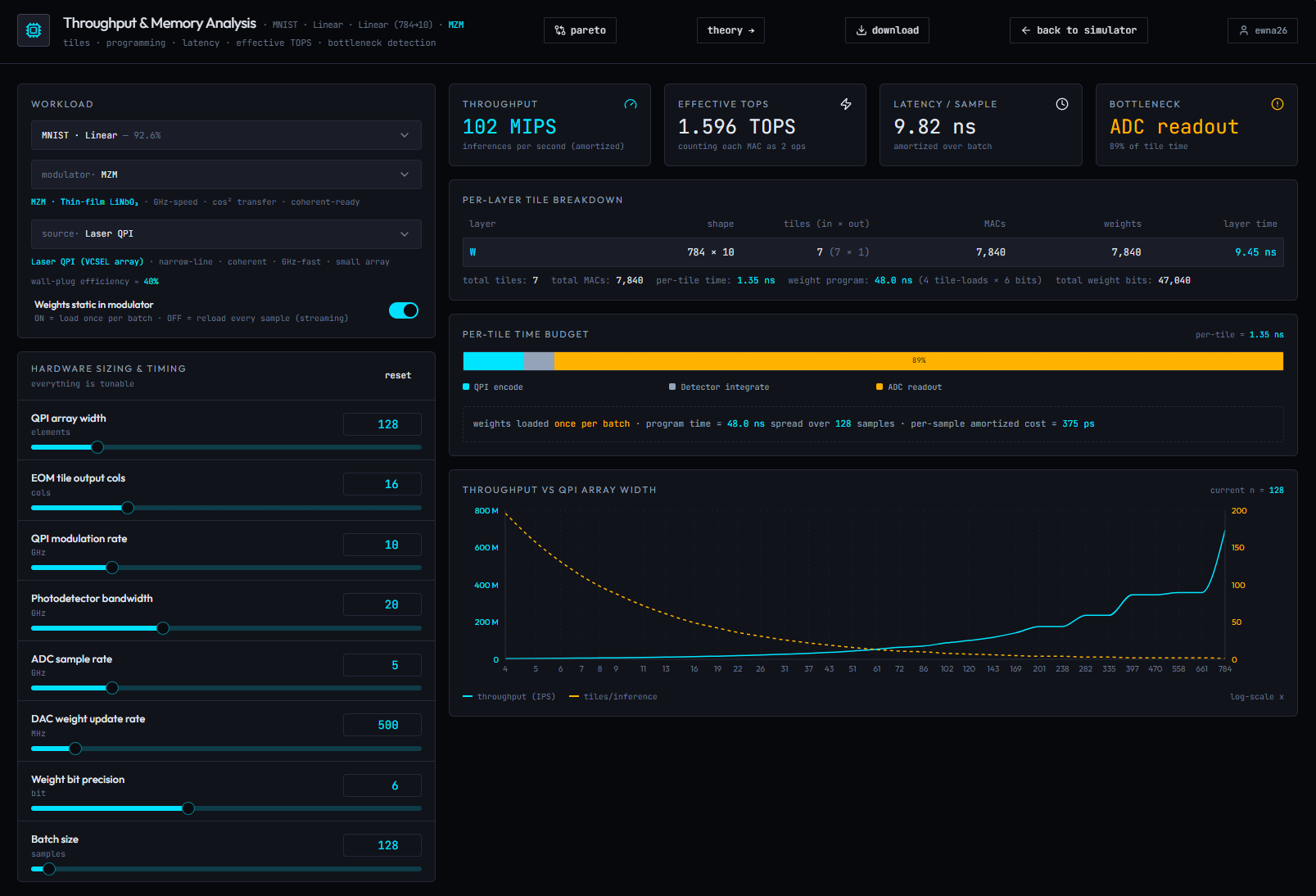
The Throughput & Memory Analysis page reports the four numbers that matter: THROUGHPUT in inferences per second (102 MIPS amortized in this run), EFFECTIVE TOPS counting each MAC as 2 ops (1.596 TOPS), LATENCY / SAMPLE amortized over the batch (9.82 ns) — and the BOTTLENECK, which names what is limiting you right now (here: ADC readout, eating 89% of tile time).
The left side is hardware sizing, and everything is tunable: array width (128 elements), EOM tile output cols (16), modulation rate (10 GHz), photodetector bandwidth (20 GHz), ADC sample rate (5 GHz), DAC weight update rate (500 MHz), weight bit precision (6 bit) and batch size (128) — plus the weights-static-in-modulator switch: ON loads once per batch, OFF reloads every sample (streaming).
Below, the per-layer tile breakdown maps the model onto tiles — the Linear 784→10 layer becomes 7 tiles and 7,840 MACs, with program time of 48.0 ns for 4 tile-loads × 6 bits — the per-tile time budget splits each tile into laser encode / detector integrate / ADC readout, and the throughput-vs-array-width curve traces the trade as you resize the array: inferences per second climb while tiles per inference multiply.
TIP — The BOTTLENECK card tells you which slider to touch — with ADC readout at 89%, the ADC sample rate is the first knob to turn.
08
Find the sweet spot on the Pareto pages
step 9 of 9
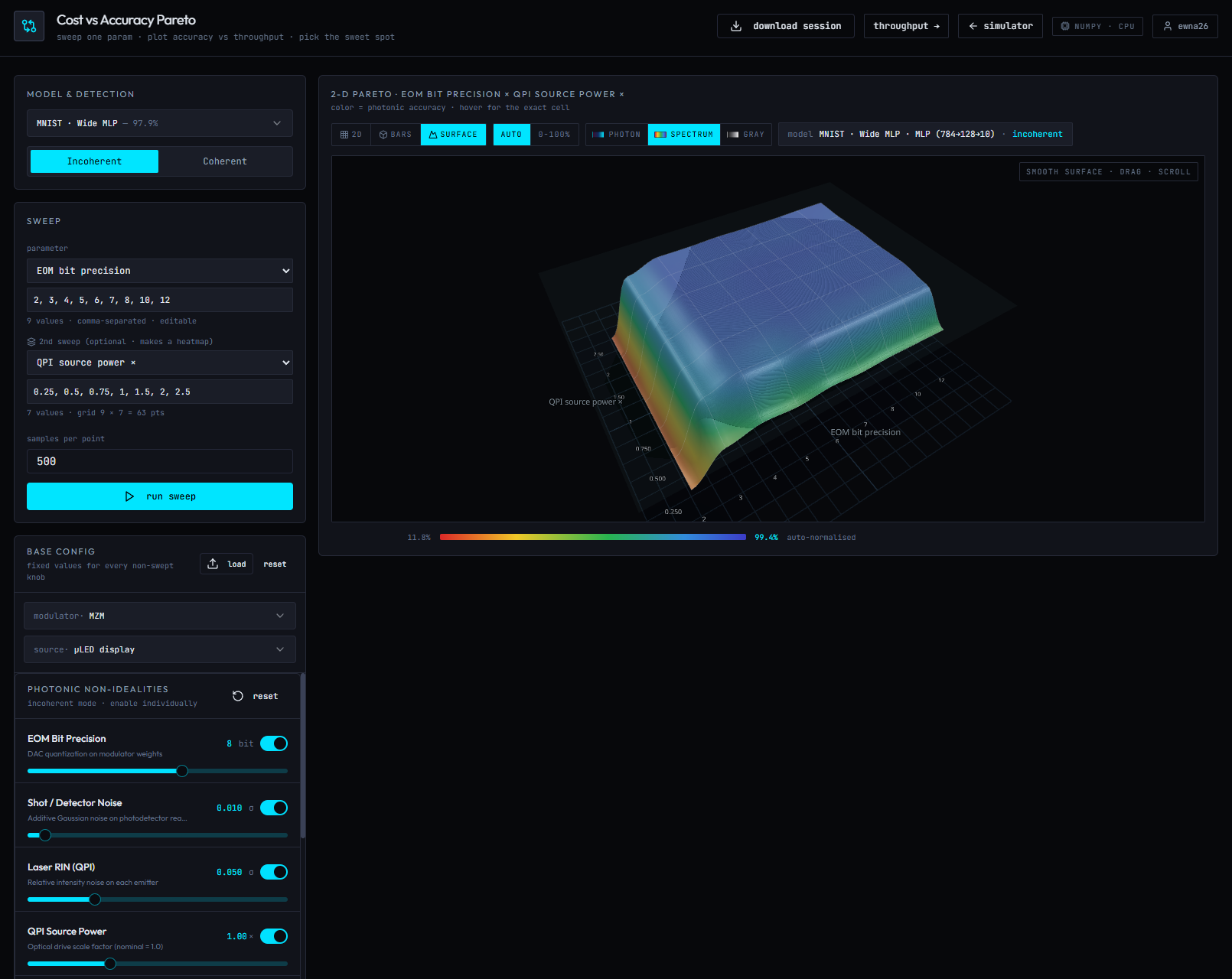
The Cost vs Accuracy Pareto page is where the simulator earns its name — its own tagline: sweep one param · plot accuracy vs throughput · pick the sweet spot. Choose the parameter to sweep (EOM bit precision here, over 2, 3, 4, 5, 6, 7, 8, 10, 12 — editable, comma-separated), fix every other knob in the base config, and run the sweep at 500 samples per point.
Add the optional second sweep and it becomes a 2-D Pareto heatmap — here EOM bit precision × source power, a 9×7 grid of 63 points rendered as a smooth, draggable 3-D surface (bars available too). Color is photonic accuracy, auto-normalised from 11.8% at the collapsed red corner to 99.4% at the blue plateau — and hovering any cell gives you the exact value.
Read the plateau: accuracy is flat from roughly 8 bits upward, so eight bits is already the efficient choice. The sweet spot is the corner that meets your accuracy target at the lowest power and cost — then commit to hardware.
fig. 08 — 2-D Pareto surface · EOM bit precision × source power
TIP — The left rail lets you swap the model, flip detection and retune the non-idealities — the Pareto surface will answer for every combination.